
GNSS Navigation Test Solution
GNSS Hardware-in-the-Loop (HIL) Testing Solution
Bring real GNSS receiver hardware into your HIL test bench. NSG8000 converts external motion data into corresponding GNSS RF for dynamic receiver and navigation-system evaluation.
Latency refers to external motion-data input to corresponding GNSS RF output; it excludes receiver and controller processing. Interfaces, motion fields and RF options are confirmed for the selected configuration.
Principle & System Architecture
How GNSS HIL Works
An external HIL model calculates the vehicle’s motion. NSG8000 generates the corresponding GNSS RF so a real receiver performs acquisition, tracking and navigation processing . In a closed-loop test, the controller’s response feeds back into the model and changes the next motion state.
Example: closed-loop navigation control
Real hardware: receiver + controller01 / SIMULATED DYNAMICS
External HIL Model
Calculates vehicle motion and the reference truth state.
02 / GNSS RF GENERATION
NSG8000
Updates the GNSS scenario from the incoming motion state.
03 / REAL RECEIVER
GNSS Receiver
Tracks RF and computes position, velocity and time.
04 / REAL CONTROLLER
Navigation Controller
Uses navigation estimates to generate control commands that update the external model.
Collect model truth, receiver outputs and controller commands through a separate observation path.
- Motion, navigation & control data
- GNSS RF
- Observation & logging
-
01
The model defines the reference motion
The external HIL model applies vehicle dynamics and controller commands to calculate the next motion state. This model state provides the reference truth against which receiver estimates are evaluated.
-
02
Motion becomes corresponding GNSS RF
As position and velocity change, satellite-to-receiver ranges and relative velocities change. GNSS simulation represents this through signal delay and Doppler. NSG8000 updates the scenario and delivers the corresponding RF to the receiver.
-
03
The real receiver computes its own solution
The receiver acquires and tracks the generated satellite signals, then calculates position, velocity and time (PVT). Its navigation output is an estimate, rather than a direct copy of the model’s truth data.
-
04
Controller feedback changes the next state
The navigation controller uses receiver estimates to calculate control commands. The external model applies their effect to vehicle motion, producing the next state sent to NSG8000 and closing the loop.
Timing matters: align coordinate definitions, units and timestamps. Motion update rate, motion-input-to-RF latency and receiver output rate describe different parts of the test chain. Compare receiver estimates with model truth at the same measurement epoch.
Test Example / Vehicle Navigation
Example: Evaluating Navigation During a Turn
Does a receiver firmware change affect position estimates and steering behavior during a turn? This example follows a modeled vehicle through an approach, a left turn and an exit straight, connecting receiver measurements to the response of the closed-loop system.
Illustrative test procedure
Route values are scenario settings; no measured performance is shown.
One route, three observation phases
- 1 / Approach 100 m straight
- 2 / Turn 90° left · 50 m radius
- 3 / Exit 100 m straight
Define the comparison before running
- Test bench
- Real GNSS receiver and steering controller; vehicle and actuator dynamics in the external HIL model.
- GNSS input
- NSG8000 supplies conducted GNSS RF corresponding to the model’s current motion state.
- Target speed
- 10 m/s throughout the reference route.
- Coordinate frame
- Local ENU for route analysis, with a defined geographic origin and conversion to the agreed simulator input frame.
- Change under test
- Baseline receiver firmware A versus candidate receiver firmware B.
- Fixed conditions
- Initial model state, controller settings, dynamics, GNSS configuration, start epoch, RF path and receiver reset procedure.
The route and speed are references. Actual modeled motion is produced by the controller and vehicle model, and may differ between firmware versions.
Run the complete test sequence
-
01
Freeze the setup and acceptance limits
Save the route, initial state, model and controller configuration, GNSS settings and firmware ID. Define reset and pre-roll rules, event markers, run count, completion timeout and pass/fail limits. Use the same definitions for both firmware versions.
-
02
Prepare the receiver and start logging
Load firmware A, verify the RF connection and level, then apply the defined reset and pre-roll procedure. Start the motion phase from (E, N) = (0, 0), moving east at 10 m/s, only after the agreed valid-navigation condition is met. Enable feedback and synchronized recording.
-
03
Observe approach, turn and exit
Let the controller follow the reference route while the model supplies live motion states to NSG8000. Mark turn entry and exit using the agreed route-progress rules. Record model truth, receiver PVT and validity, steering commands and their timestamps until completion or timeout.
-
04
Repeat with the candidate firmware
Restore the same configuration and initial conditions, load firmware B and repeat the procedure with the same run count. Compare approach, turn and exit windows using consistent event alignment. Retain timed-out or failed runs in the test record.
Read the receiver and system response together
| Observation | Compare these records | Question answered |
|---|---|---|
| Receiver position error | Receiver PVT versus model truth at the same measurement epoch and in the same coordinate frame. | Does position error increase during the turn, and does the candidate firmware change that behavior? |
| Path-following error | Actual modeled vehicle position versus the reference route throughout the maneuver. | Does the vehicle follow the turn and exit straight within the agreed path-deviation limit? |
| Controller response | Steering commands, model response and turn-event timestamps. | When does corrective action begin, and does the modeled motion settle within the agreed exit window? |
| Navigation continuity | Receiver solution-validity records, PVT measurement epochs and output arrival times. | Are there invalid solutions or output gaps during the maneuver, and how long do they persist? |
Scroll horizontally to view the full observation table.
Test evidence: configuration snapshot, firmware IDs, timestamped run records, event-aligned comparison and pass/fail record.
Discuss Your Navigation Test →Measurement & Acceptance
Measurements and Acceptance Criteria
Evaluate input timing, GNSS RF response and navigation-system behavior with clearly defined measurements. Each acceptance item needs a data source, a comparison method, an observation window and an agreed limit.
Define the input-to-RF boundary
- Input time
- Receipt of the selected motion update at the agreed NSG8000 input interface.
- RF time
- Verified time when RF at the NSG8000 output represents the corresponding updated state.
Latency = tRF − tinput
Use a common time base and a verified RF observation method. Input packet logs establish arrival timing; RF evidence establishes when the state reaches the output. Receiver and controller processing are outside this boundary.
Compare PVT at matching epochs
Transform receiver output and model truth into the same coordinate frame. Evaluate truth at the receiver’s measurement epoch, with any resampling method documented.
eH(t) = √(ΔE(t)² + ΔN(t)²)
For local ENU analysis: ΔE and ΔN are receiver minus model-truth coordinates at epoch t. PVT measurement time and message arrival time describe different timing effects; record both when available.
Connect each metric to its evidence
Select DUT outputs and measurement equipment for the required test. Numerical limits and the required statistics are agreed before execution.
| Metric | Data source | Boundary & calculation | Acceptance check |
|---|---|---|---|
| Motion-to-RF latency | Input receipt timestamps and verified RF-state observations on a common time base. | Elapsed time from receipt at the defined input interface to corresponding RF at NSG8000 output. | Check the agreed latency limit. Report measured maximum, required percentile, timing resolution and measurement uncertainty. |
| Input timing & jitter | Model message timestamps, sequence identifiers and interface arrival records. | Compare arrival intervals with the declared cadence; check delivery deadlines and count late, missing, duplicated or out-of-order updates. | Check interval variation and update exceptions over the agreed window, using the defined tolerances. |
| Position & velocity error | Receiver PVT and model truth aligned by measurement epoch and coordinate frame. | Calculate receiver-minus-truth position and velocity errors. Evaluate horizontal and vertical components as required. | Apply the agreed peak, RMS or percentile limits. Record invalid periods separately from valid-sample error statistics. |
| Controller response | Agreed test-event markers, controller commands and modeled vehicle response. | Measure event-to-command onset and event-to-stable modeled response separately; define the tolerance band and required dwell time. | Apply separate response-time and settling-time limits for the selected maneuver and observation window. |
| Path-following error | Actual modeled vehicle positions and the defined reference route. | Calculate cross-track deviation in the agreed analysis frame throughout approach, turn and exit. | Check the permitted path corridor and maximum absolute deviation for each route phase. |
| Navigation continuity | Available DUT validity flags, PVT measurement epochs and output arrival records. | Identify invalid-navigation intervals and delivery gaps against the configured output cadence. Report these separately. | Check longest and total invalid duration, output-gap duration and valid-navigation fraction under the agreed definitions. |
Scroll horizontally to view all measurement and acceptance columns.
Specification boundary: evaluate the published motion-input-to-RF capability using the same start and end points and the agreed configuration. Receiver output timing, controller response and complete-loop behavior require their own measurements.
Make the acceptance decision traceable
-
01 / DEFINE
Agree the decision rule
Specify limits, statistics, run count, observation windows, valid-sample rules and measurement uncertainty. State which phases and outputs must pass.
-
02 / VERIFY
Check the evidence
Verify timestamp alignment, frame conversions, record coverage and RF measurement validity. Keep missing-data intervals, failed runs and exceptions in the record.
-
03 / EVALUATE
Apply the agreed limits
Compute the required statistics for each applicable phase and run. Record the decision and link each result to its source evidence.
Pass
Required evidence is complete and valid, and all applicable acceptance criteria are met.
Fail
Valid evidence shows that one or more applicable acceptance criteria are not met.
Not verified
Necessary evidence is missing or the agreed measurement method was not completed.
Acceptance record: configuration and firmware IDs, measurement method, time and coordinate definitions, observation windows, required limits, measured statistics, data coverage, exceptions and the final decision.
Test Bench Integration
Integration Requirements and Configuration
Define how motion data enters the simulator, how RF reaches the receiver, and how results are observed. These requirements guide interface adaptation, system configuration and acceptance planning.
UDP / TCP / CAN interface options: compatibility is reviewed against the actual I/O, message format, motion fields and timing requirements. Customer-specific messages may require parsing, conversion or additional interface development.
Prepare the integration inputs
Start with the information available. Sample messages and detailed interface documents can be added during technical review.
| Requirement | Information to provide | Engineering decision |
|---|---|---|
| Platform and system roles | HIL platform and software version; external dynamics model; receiver and controller; available I/O; a system block diagram. | Identify the motion source, simulator connection and controller feedback path, including who implements each interface. |
| Protocol and messages | Selected transport; message specification and sample data; field layout, byte order and scaling; start, stop and reconnect behavior. | Confirm the available interface or define the parsing, mapping and adapter work needed for the customer protocol. |
| Motion fields and coordinates | Required position, velocity, acceleration and time fields; coordinate frame, datum and origin; axis directions, units, ranges and precision. | Agree the accepted fields and conversions so the incoming motion represents the intended receiver location and dynamics. |
| Update behavior and time | Update period; clock and time base; timestamp meaning; scenario start time; sequence rules and handling of late, missing or out-of-order messages. | Define scheduling and exception behavior. Distinguish the motion-state epoch from packet arrival time when aligning observations. |
| Receiver and RF connection | DUT model and RF connector; required GNSS signals; input-level requirements; cables, attenuation and any antenna-port DC bias. | Plan the RF path and level at the DUT input, including any required DC blocking, protection or path-loss checks. |
| Outputs and test evidence | Available receiver PVT and status outputs; measurement timestamps; model truth and controller logs; test objectives and measurement equipment. | Determine which results can be verified, how records will be aligned, and who supplies the logging and measurement tools. |
On smaller screens, scroll horizontally to view all three columns.
Choose the configuration around the test
- GNSS signals and licences
- List the constellations, signals and frequency combinations required simultaneously. Confirm the corresponding hardware options and software licences for the selected configuration.
- RF outputs and motion states
- Define the receiver count and whether receivers share one motion state or require different states. Up to four optional RF outputs are configuration-dependent. A splitter distributes a shared signal; independent motion states require the corresponding independent RF configuration.
- Update rate and latency target
- Match the input cadence to the external model and test dynamics. Specify the motion-input-to-RF target separately from receiver and controller response, using the agreed measurement boundaries .
- Adaptation and commissioning
- Identify any protocol adapter, conversion script or driver work. Agree remote or on-site access, local operating support and the validation tasks included in the project scope.
Agree the responsibilities
Confirm ownership of each part before commissioning begins.
External test bench
Dynamics model, receiver, controller, feedback interfaces and access to test logs. Name the owners of these systems and their software.
GNSS configuration
NSG8000 hardware and options, signal licences, RF allocation and the agreed simulator-side mapping or adaptation work.
Joint verification
Coordinate and time alignment, input-data checks, RF-path checks and the measurement method used to evaluate the agreed acceptance criteria.
External instruments, adapters, custom development and on-site services are identified separately in the agreed scope.
Review output: interface specification and configuration baseline
Record the message mapping, coordinate and time definitions, signal licences, RF allocation, engineering responsibilities and acceptance scope.
For an initial review, share your HIL platform, DUT, required signals, receiver count and timing objectives.
GNSS Simulation Platform
NSG8000 in the HIL Test Bench
NSG8000 provides the GNSS scenario-update and RF-generation layer of the test bench. Select its signal, interface and RF options to match the external model and receiver under test.
NSG8000
Multi-Constellation GNSS Signal Simulator
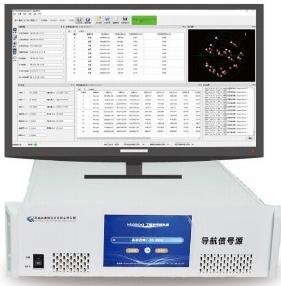
Supplied hardware, software and accessories follow the agreed configuration.
View NSG8000 & Specifications →HIL capabilities and selectable options
- Real-time motion input
- Position, velocity, acceleration and time fields, with accepted fields and conversions defined by the interface specification.
- HIL update rate
- 1 Hz–1 kHz. The selected rate is reviewed against model dynamics, interface behavior and timing requirements.
- GNSS signal selection
- BDS, GPS, GLONASS and Galileo. Required signals, simultaneous frequency combinations and licences are confirmed for the configuration.
- HIL interface options
- UDP / TCP / CAN. Actual I/O, message compatibility and any adaptation work are reviewed for the project.
- Optional multi-RF
- Up to four RF outputs. Different receiver positions and motion states require the corresponding independent RF configuration.
Options and licences are confirmed in the configuration baseline. Use the integration requirements to define the required bench configuration.
System boundary: the external test bench supplies the dynamics model, controller feedback and result analysis. NSG8000 supplies GNSS scenario updates and RF generation.
Project-specific function customization
Selected functions can be customized to match your HIL workflow. Requests may include customer-protocol adaptation, field conversion or test automation.
Share the inputs, expected behavior and acceptance criteria. Engineering review confirms feasibility, hardware and software dependencies, development scope and delivery before the function is agreed.
Implementation & Handover
Commissioning and Deliverables
Connect each commissioning stage to a documented result. Configuration, interface adaptation, joint testing and operator handover are planned against the agreed technical and commercial scope.
From configuration review to operator handover
Agree the stages and deliverables below for your project.
| Stage | Commissioning activity | Deliverable |
|---|---|---|
| 01 Confirm the baseline | Agree the DUT, signals, RF allocation, data mapping, timing boundaries, test cases and acceptance limits. | Configuration baseline, interface specification and acceptance-test plan. |
| 02 Configure and connect | Set up the selected NSG8000 options and RF path. Implement the agreed mapping or adaptation and check sample inputs. | Configured NSG8000, agreed software and licences, and an interface setup record. |
| 03 Verify data and RF | Check units, timestamps, update behavior, RF delivery and receiver response. Verify timing with the agreed method and instruments. | Data and RF verification records, timing evidence and an open-item list. |
| 04 Run and evaluate | Execute defined scenarios and compare aligned observations with acceptance limits. Test controller feedback where it closes the loop. | Scenario and configuration IDs, test logs, measurement results and the acceptance record. |
| 05 Handover and training | Demonstrate the agreed start/reset, logging and review workflow. Train the responsible operators within the delivery scope. | Versioned configuration files, operating instructions, test procedures and a training record. |
On smaller screens, scroll horizontally to view all three columns.
Acceptance evidence: record each criterion as Pass, Fail or Not Verified, with its method, supporting evidence and unresolved items. Use the agreed measurements and acceptance criteria .
Prepare for joint commissioning
Have the DUT, external model, sample input stream, RF connection and logging access ready. For remote sessions, confirm a local operator, the required instruments and the remote-access method.
Confirm the delivery package
Itemize hardware, licences, cables and adapters, development work, scenario files, documentation and training. Confirm commissioning sessions and any on-site services in the project scope.
Define the commissioning scope for your bench
Share your test-bench readiness, preferred commissioning method and acceptance objectives. Engineering review identifies the required integration tasks and project deliverables.
Integration Questions
GNSS HIL Integration FAQ
Resolve platform compatibility, optional configurations and development scope before planning your GNSS HIL system.
Can NSG8000 integrate with our existing HIL platform?
Compatibility is assessed from the available I/O, motion fields, message format and timing behavior. Share the platform model and interface documentation so the required mapping and adaptation can be defined.
Can we use a customer-defined protocol over UDP, TCP or CAN?
These are interface options. Customer-defined messages require review of field layout, units, timestamps and update rules. Parsing, conversion or adapter development may be required for the selected interface.
Which options and functions are project-specific?
Signal licences, RF-output count and interface adaptation are confirmed per configuration. Selected functions can be customized after feasibility review, with dependencies, development work and acceptance criteria recorded in the agreed scope.
Can multiple receivers follow different motion states?
With the corresponding optional RF configuration, NSG8000 can represent up to four separate receiver positions and motion states. A splitter supplies the same shared RF signal.
Does every HIL test use a closed loop?
Real-time HIL can be open-loop. A closed loop requires receiver or controller response to alter the next motion state of the external model. Logging alone does not close it. See how GNSS HIL works .
What does motion-input-to-RF latency cover?
It spans motion-data receipt at the agreed simulator input boundary to the corresponding RF output state. Receiver and controller processing are outside that boundary. Verification uses the agreed measurement method and evidence .
Can commissioning and training be carried out remotely?
Remote joint commissioning can be planned around local bench access, an operator, instruments and logs. Sessions, documentation, training and any on-site work are confirmed in the delivery scope .
Engineering Review
Discuss Your GNSS HIL Test Bench
Send your bench requirements for a review of interface compatibility, RF options and any project-specific development.
Start with the information available. Detailed message specifications and sample data can follow during technical review.
Useful for the first review
- Platform
- Model, software environment and available interface.
- DUT & objective
- Receiver or navigation system; behavior to evaluate.
- GNSS signals
- Constellations and frequency combinations.
- RF configuration
- Receiver count and shared or independent motion states.
- Timing
- Input update rate and required measurement boundary.